Inside FillBetter
Correct documents quickly in our editor.
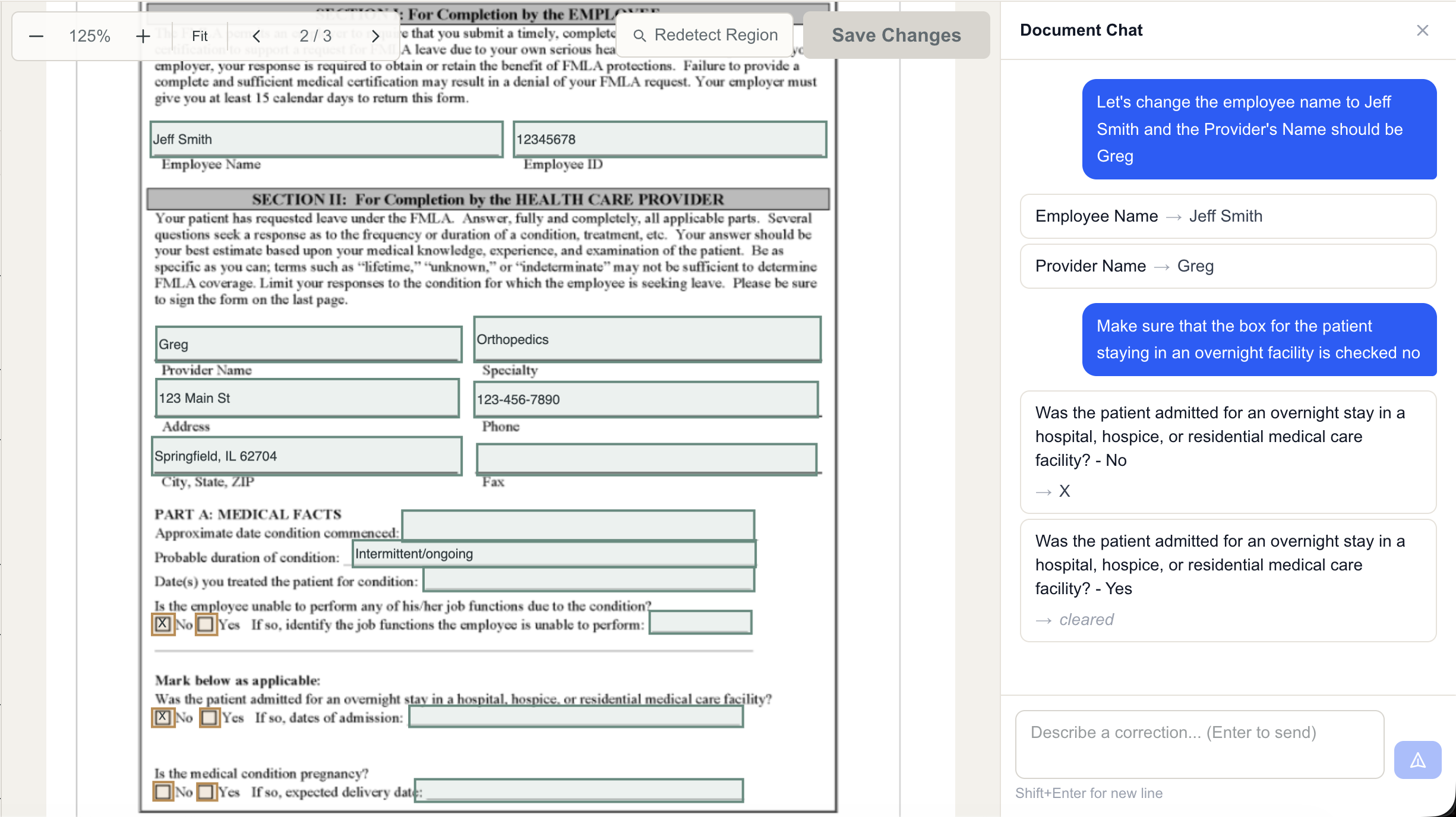
FillBetter fills the form and our staff review it before it comes back to your team. When you need a correction, MAs, PAs, and providers can edit fields directly or ask Document Chat to make the change.
Want this for your practice? Contact us to discuss your forms and EHR.
Direct editing
Make a correction right on the form.
Update a date, change an answer, or check a box. Review the result before you save or submit your changes.
Edit an answer
Click a text field and update the answer directly on the form.
Change a checkbox
Select or clear a checkbox without printing and rescanning the document.
Document Chat
Describe the correction. Review the changes.
Ask Document Chat to update an answer or make several edits together. The editor shows what changed so your team can check the result.
Back to your workflow
Your team controls the final document.
Review the completed form, make any corrections, and continue with signature in your EHR. Access and document return are set up around your practice’s system and workflow.
Talk to us about your practice.
Contact us about the forms your team needs filled. We’ll walk through your EHR workflow, show you FillBetter, and discuss pricing and next steps.
Contact our teamStart with your EHR and the forms that take up the most time.